Table of Contents
Get more resume writing tips, career insights, and workforce trends in your personalized search experience.
What You Need to Know
- The best online resume builders in 2026 combine professional formatting, ATS-friendly templates, and useful writing guidance.
- AI can help brainstorm and improve resume content, but a dedicated builder also manages layout, spacing, alignment, and document formatting.
- Free resume builders are available, but some limit templates, downloads, AI features, or other tools unless you upgrade.
- The right builder depends on your priorities, including customization, ease of use, job-tailoring features, and budget.
AI has changed the resume-writing landscape, but generating resume text is no longer the hard part. The challenge is turning that content into a polished document compatible with applicant tracking systems (ATS) without spending more time fixing formatting than writing.
We compared seven of the best online resume builders in 2026 to see where each one stands out, where it falls short, and which features may matter most for your job search.
These are the seven best resume builders of 2026:
- Zety
- EnhanCV
- MyPerfectResume
- Kickresume
- LiveCareer
- Teal
- Monster Resume Builder
Want to save time and have your resume ready in five minutes? Try our Resume Builder. It’s fast and easy to use. Plus, you’ll get ready-made content to add with one click.
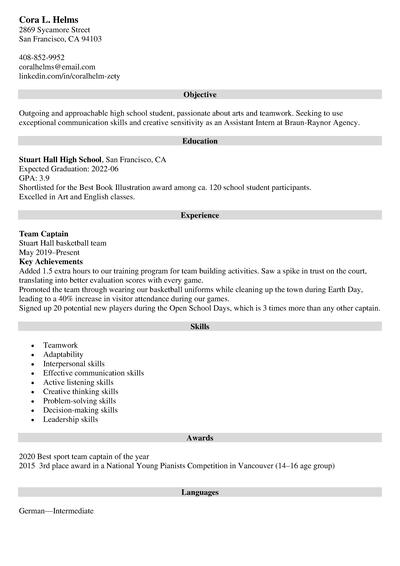
Sample resume made with our builder—See more resume examples here.
One of our users, Chris, had this to say:
You cannot go wrong with Zety. The company does best at enhancing your resume and helping market yourself better to land the job you love.
Trustpilot Ratings: What Users Say About Popular Resume Builder Software
Thousands of real job seekers use resume builders every day on their desktops and mobile devices. Here’s a quick look at what users say about these popular resume builders on Trustpilot:
| Resume Builder | Trustpilot Rating* | Core Feature | Pricing |
| Zety | 4.3/5 | User-friendly design with excellent templates and content suggestions | Free basic; $1.95 14-day trial, then $25.95 every 4 weeks |
| Enhancv | 4.7/5 | AI features to help tailor resumes and identify grammar mistakes | Free basic; Pro from $19.99/month |
| MyPerfectResume | 4.5/5 | Streamlined resume building and abundant template choices | Free basic; $2.95 14-day access, then $23.95 every 4 weeks |
| Kickresume | 4.6/5 | Seamless navigation and sleek templates | Free; Premium from $8/month annually |
| LiveCareer | 4.3/5 | Simple resume creation with plenty of customization options | Free basic; $2.95 14-day access, then $23.95 every 4 weeks |
| Teal | 4.2/5 | Effective application tracking and resume management | Free; Teal+ from $13/week |
| Monster Resume Builder | 3.9/5 | Free resume-building and job search ecosystem | Free |
*Trustpilot ratings as of September 2026.
7 Best Online Resume Builders for 2026
Here’s a closer look at these resume builders—their key strengths, common drawbacks, and how they rank in our expert review.
1. Zety
BOLD LLC operates this website. While we strive to provide objective information, our ownership may influence the review.
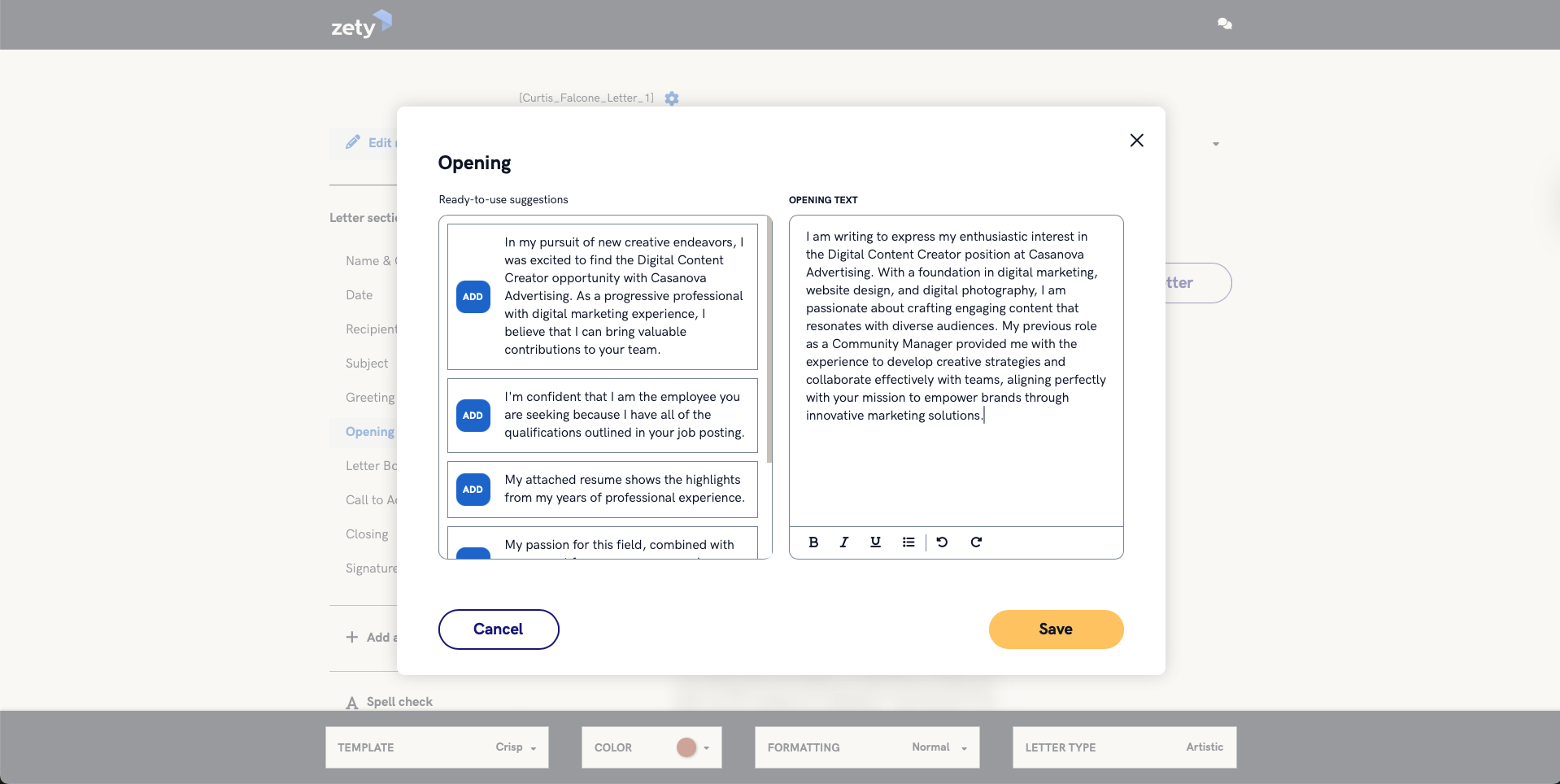
Having Zety at the top of a best resume builder list on Zety’s own blog is an obvious choice, right? Still, its popularity and features help explain its position here.
Over 1 million users have already chosen the Cascade template, our most popular resume design. And that’s only one of the many resume templates and features available to help streamline the writing process.
Zety.com gives a laundry list of options to choose from on what to write and how to write it. Their suggestions are amazing and help out so much for those who are first-time resume writers or want to take their resume writing to another level.
Our Resume Builder offers sleek, professional template options designed to comply with applicant tracking systems. As you create your resume, our content suggestions will help you refine your resume summary, work experience, and education sections to highlight your strengths.
It’s easy, intuitive, streamlined, and built to guide you through the process in simple steps and have your resume ready in no time. You can also create a matching cover letter that expands on your career story in our Cover Letter Generator.
Pricing & Features
Our basic package is completely free and includes the following:
- Resume builder
- Cover letter builder
- Free content downloads in TXT format
- Bold.pro
Our Pro Package offers a 14-day trial for $1.95, then auto-renews at $25.95 billed every four weeks. This option includes everything above and allows unlimited downloads in PDF, Word, and TXT formats.
Our Annual Package includes the same features as our Pro Package, but you can pay $71.40 for the entire year, which is equivalent to $5.95 monthly.
Pros & Cons
| Pros | Cons |
| Matching cover letter builder | Resume sections may change order when switching templates |
| Built-in expert tips and suggestions | Basic package has a text-only download option |
| Intuitive navigation | 14-day trial is not free |
2. LiveCareer
BOLD LLC operates this website. While we strive to provide objective information, our ownership may influence the review.
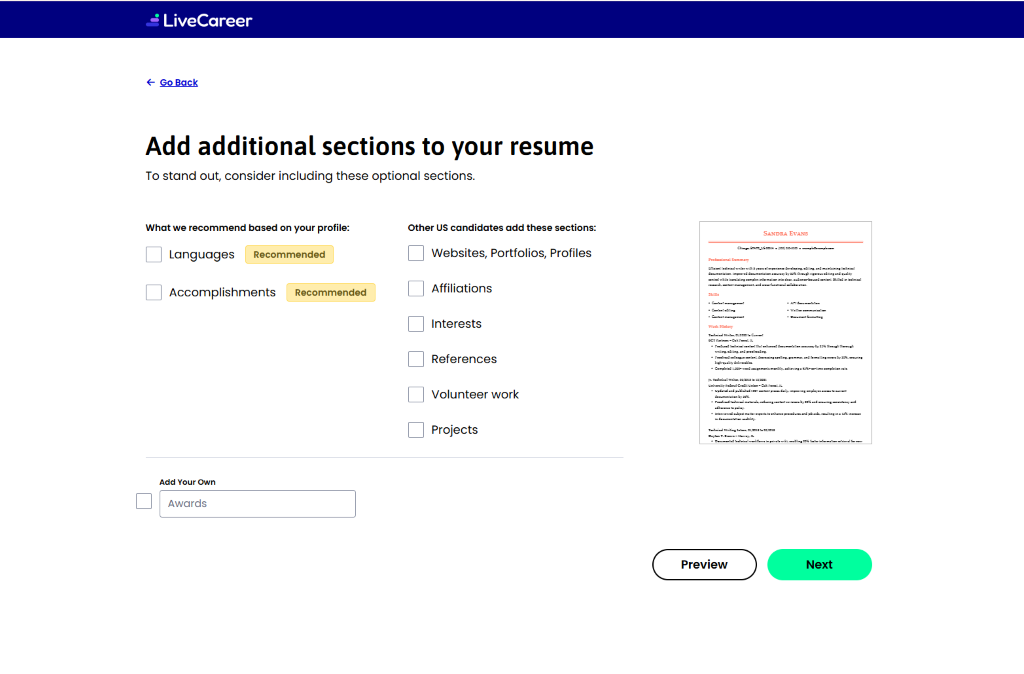
LiveCareer earned the 2024 Customer Choice Award from SmartCustomer (formerly Sitejabber). It offers more than 25 modern resume templates designed for all types of job seekers, whether they’re creative, analytical, or prefer a classic style.
Users can create resumes and cover letters from the dashboard, and even browse jobs from major job search sites. The tool also helps tailor each resume to a specific job ad. By pasting the job description, users get a match score indicating how well their resume aligns with the role.
Pricing & Features
LiveCareer offers two subscription options:
- 14-day access for $2.95, which auto-renews at $23.95 billed every four weeks
- Annual access for $71.40 upfront, which equals $5.95 monthly
Both of these options include the following:
- Unlimited downloads in PDF, Word, RTF, and TXT
- Resume and cover letter builder
- Resume check
- Hundreds of templates
- Personalized URL
- 24/7 customer support
Pros & Cons
| Pros | Cons |
| Able to browse for open roles from job sites | Only offers free downloads in TXT format |
| ATS resume checker | Changing the template may affect the order of your sections |
| Visually appealing templates | Most features are not free |
3. MyPerfectResume
BOLD LLC operates this website. While we strive to provide objective information, our ownership may influence the review.
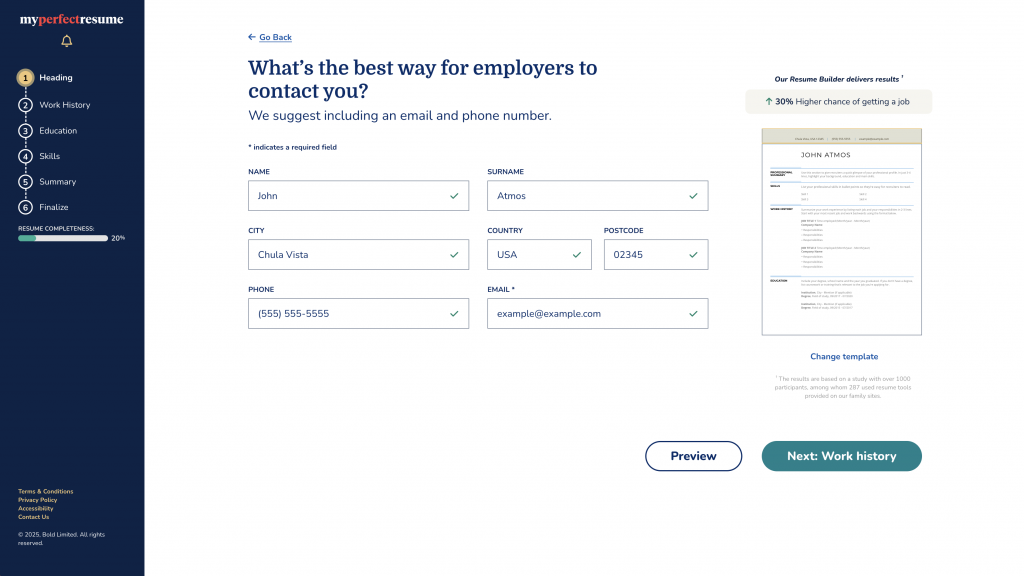
MyPerfectResume’s builder handles formatting and section titles, and even provides ready-made content suggestions you can customize to describe your work experience. It offers a wide range of resume and cover letter templates, making it easy to match your style and industry.
The platform is comprehensive and intuitive, guiding users step by step while offering improvement tips along the way. Plus, users can create a Bold.pro profile directly, giving their resume even more visibility to potential employers.
Pricing & Features
MyPerfectResume offers a free basic access package with these features:
- Resume and cover letter builders
- Ready-made content suggestions
- Downloads in TXT format
Premium access costs $2.95 for a 14-day trial and auto-renews at $23.95, billed every four weeks. Annual access costs $95.40. Premium features include:
- Professionally designed templates
- Unlimited downloads in PDF and Word
- Resume check feedback
- Bold.pro profile
- Interview preparation tools
- Career development webinars
- Open roles suggestions and application tracking
Pros & Cons
| Pros | Cons |
| Free ready-made content suggestions | No free professional templates downloadable through the builder |
| User-friendly builder | Most features are not free |
| Comprehensive career tools for tracking applications and finding job openings | Templates lean toward traditional industries |
4. EnhanCV*
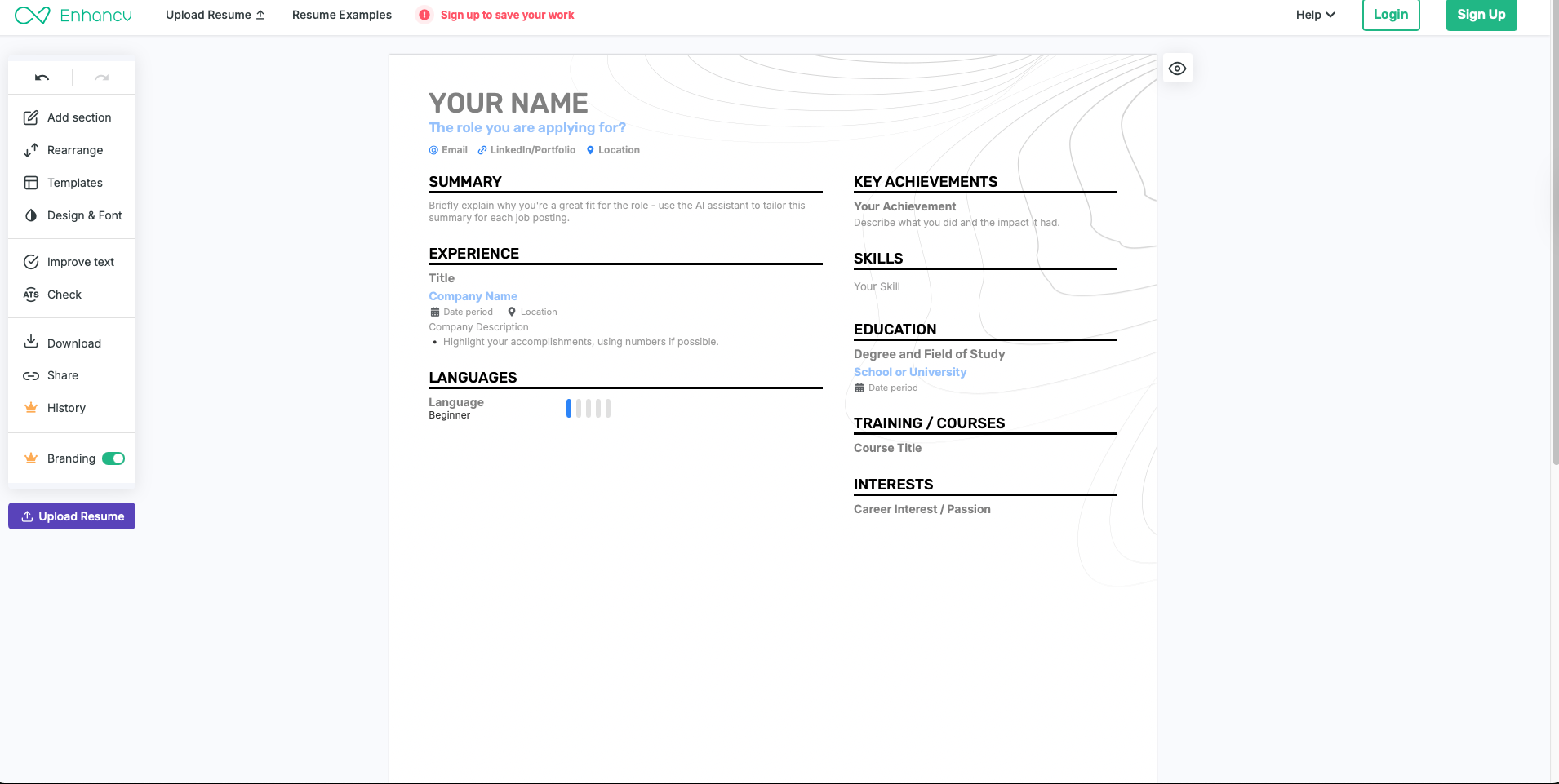
Enhancv is a user-friendly resume builder with many customization options to help users create a strong application. The builder offers 20 creative templates to choose from, and the platform lets you tailor every detail—from section layout to colors and fonts.
An AI-powered assistant guides users step by step, providing improvement tips along the way to ensure each resume is polished and optimized.
Pricing & Features
Enhancv offers a basic plan that includes the following:
- All resume templates
- Basic resume sections
- Maximum 12 section items
- Access to all design tools
After a free 14-day trial, users are billed $4.99 per month for a basic plan. Alternatively, the Pro Plan offers monthly, quarterly, and semiannual billing options. The monthly option costs $19.99. Longer subscriptions lower the monthly rate to $14.99 with quarterly billing or $10.99 with semiannual billing.
The Pro plans also include:
- Up to 10 resumes
- Unlimited entries
- Pro sections for certificates, awards, references, and more
- Customizable colors, fonts, and icons
- No Enhancv branding
- Compact resume template
Pros & Cons
| Pros | Cons |
| Extensive design customization | No career tools to aid your job search |
| Up to 10 resumes with Pro | Free templates include EnhanCV branding |
| Pro sections and unlimited entries | Pricier than some other builders |
5. Kickresume*
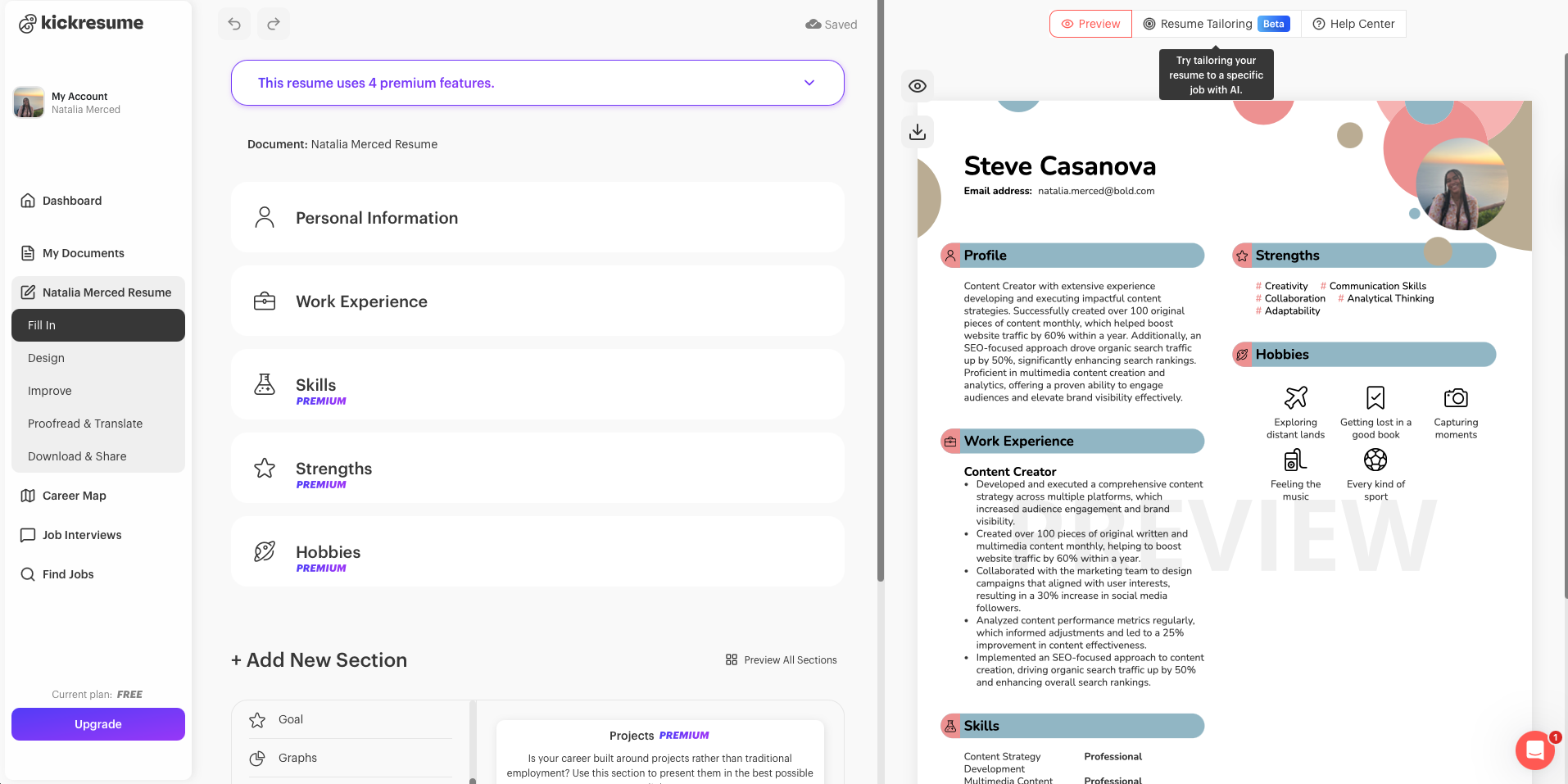
Kickresume helps users create professional documents with ease. Its builder offers a large library of professional templates, so users can pick a style that fits their industry and personal brand.
The platform’s drag-and-drop editor helps to customize layouts, adjust fonts and colors, and fine-tune each section to match the job you’re targeting.
Kickresume also includes built-in career-focused tools, such as the job finder, interview simulator, and Career Map, which help to map out your goals. Many templates also include matching cover letter designs, giving applications a consistent look.
Pricing & Features
Kickresume offers a free plan with the following features:
- 4 basic resume templates
- 4 matching cover letter templates
- 20,000 ready-made phrases
- 1 basic website template
- 1,500+ resume examples
- Unlimited downloads
Its premium plans also include these features:
- 40+ resume templates
- 40+ matching cover letter templates
- AI writer
- ATS resume checker
- Career map
- LinkedIn and PDF import
- 7 website templates
- Priority email and chat support
You can choose a premium plan for $24 per month, $18 per month when billed quarterly ($54 every three months), or $8 per month when billed annually ($96 per year).
Pros & Cons
| Pros | Cons |
| Over 50 templates | Complex interface for beginners |
| Website templates | Limited resume templates |
| AI writer | Must create an account before starting to build a resume |
6. Teal*
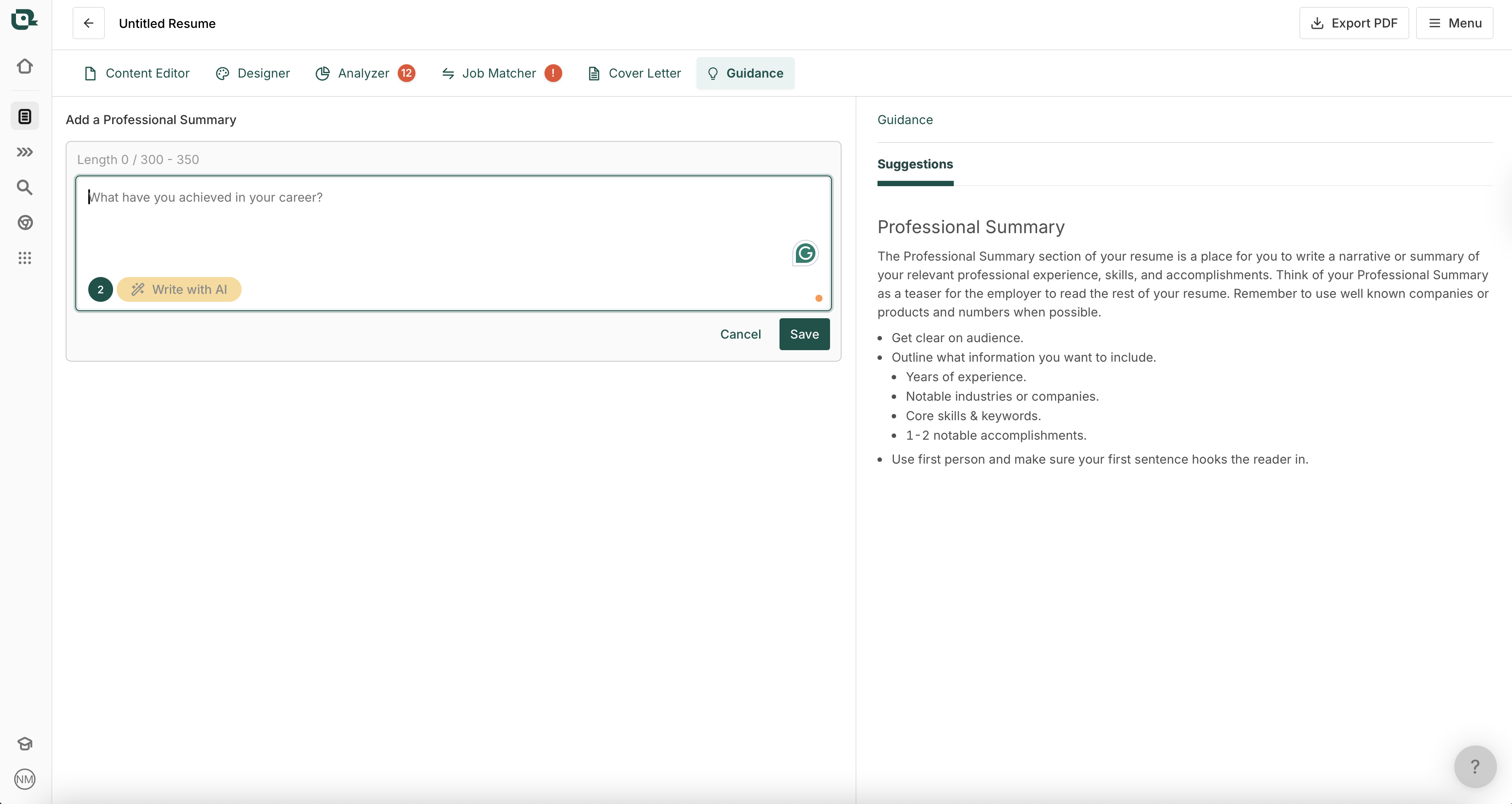
Teal’s AI-enhanced resume builder tool helps job seekers build ATS-friendly resumes. Users can start from scratch, import an existing resume, or pull in content from their LinkedIn profile. At every step, built-in guidance and AI suggestions help craft summaries and bullet points.
Job seekers can attach a job description to their resume and get a match score indicating how well their content aligns with that role, along with real-time suggestions for missing keywords and improvements.
The platform also includes tools to generate cover letters and organize multiple resume versions, making it easier to tailor applications to different jobs—all from one dashboard.
Pricing & Features
Teal’s free plan includes the following:
- Unlimited versions of your resume
- Unlimited job tracking
- 10 resume templates
- 5 job description keyword matches
- Basic resume feedback
- 1 email template per job stage
- Basic design settings
- 5 AI credits for resume bullet points
- 2 AI credits for professional summaries
- 2 AI credits for cover letter generation
Teal+ costs $13 per week, $29 per month, or $79 per 90 days and offers the following:
- Unlimited versions of your resume
- Unlimited job tracking
- Unlimited templates
- Unlimited job description keyword matches
- Unlimited email templates per job stage
- Advanced design settings
- Unlimited AI credits for resume bullet points
- Unlimited AI credits for professional summaries
- Unlimited AI credits for cover letter generation
Pros & Cons
| Pros | Cons |
| Email templates for every job search stage | Must create an account before starting to build a resume |
| Unique features for tracking applications and finding job openings | Limited free resume templates |
| Comprehensive writing guidance at every step | Pricey subscription |
7. Monster Resume Builder
BOLD LLC operates this website. While we strive to provide objective information, our ownership may influence the review.
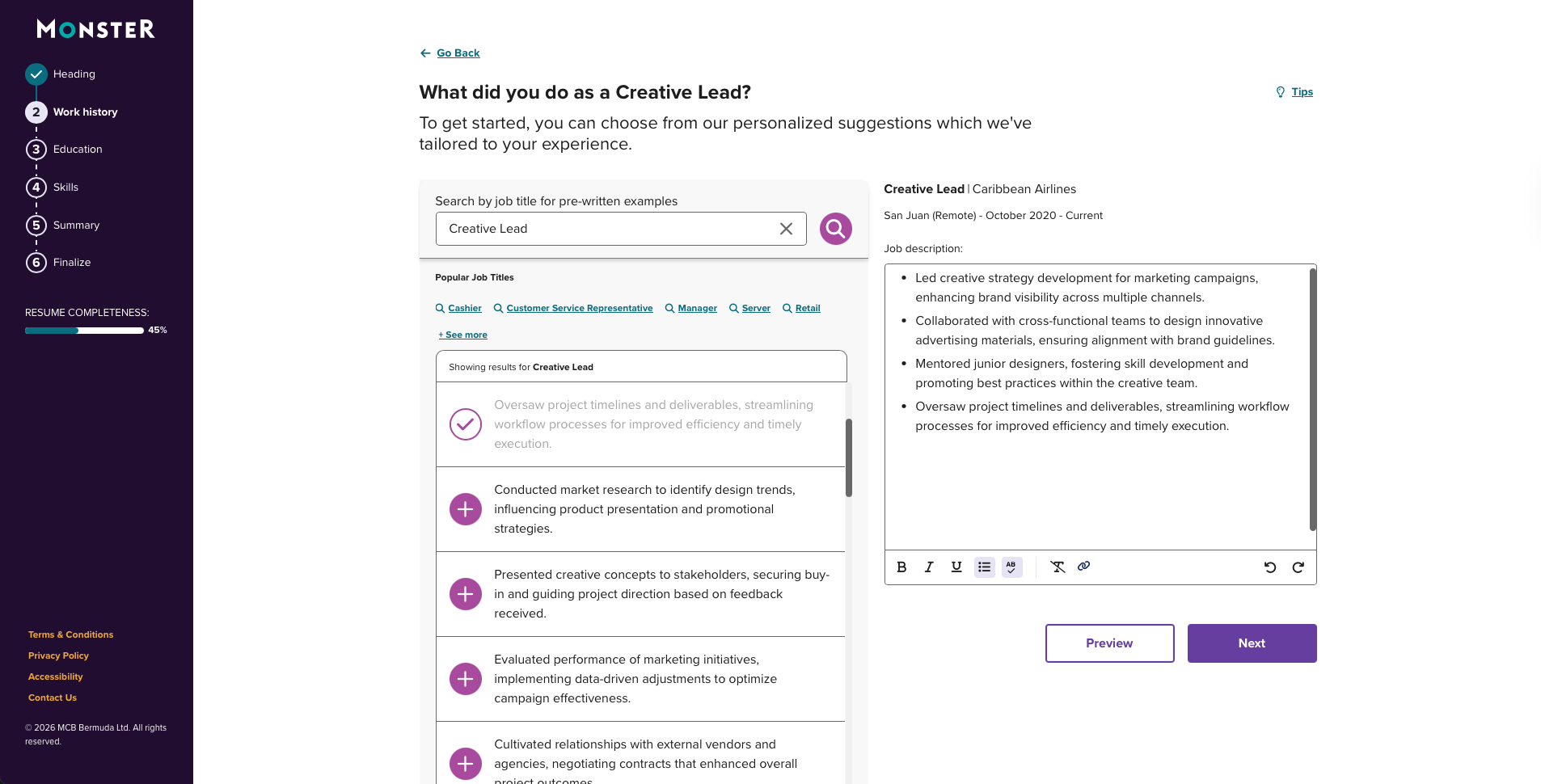
Monster’s resume builder combines professional templates, AI-powered writing assistance, and step-by-step guidance to help job seekers create a recruiter-ready resume.
What sets Monster apart is its full career ecosystem. Users get expert advice from Certified Professional Resume Writers (CPRW), data-backed hiring insights, and resources on career paths, interviewing, cover letters, and job search strategy.
Once your resume is ready, you can apply directly through Monster’s job board, streamlining your entire job search in one place.
Pricing & Features
Monster’s Resume Builder is completely free—no hidden fees, no credit card required, no trial. Job seekers can build their resume from scratch or update their existing one. Once you’re satisfied with your resume, you can download it for free as a PDF or Word document.
Pros & Cons
| Pros | Cons |
| Trusted brand with full career ecosystem | Less specialized resume-building functionality |
| ATS-friendly resume templates | Not ideal for highly specialized industries |
| Easy, guided resume creation | Fewer advanced customization options |
AI vs Resume Builders: What Job Seekers Need to Know in 2026
AI chatbots and dedicated resume builders solve different problems. A tool like ChatGPT can help you brainstorm accomplishments, strengthen bullet points, or find clearer ways to describe your experience. But generating strong resume content is only part of creating the finished document.
A dedicated resume builder handles the structural work that a general-purpose chatbot doesn’t automatically control. That includes consistent margins, spacing, section alignment, font sizing, page length, and formatting designed to remain readable by an ATS.
That difference matters when speed is the goal. Copying AI-generated content into a document and manually fixing the layout can quickly cancel out the time AI saved. A resume builder brings writing assistance and document design into the same workflow.
Don’t Let AI Write Your Entire Resume
AI can also become a liability when it replaces your experience instead of helping you communicate it.
Generic phrases such as “results-driven professional” or vague accomplishments that could belong to anyone make it harder for employers to understand what you actually did. Instead, use AI to uncover stronger ways of presenting real achievements, then add specifics such as scope, results, numbers, and context wherever possible.
A good resume builder should guide the writing process rather than simply generating paragraphs on demand. The strongest tools don’t just generate text from a job title; they prompt you to provide the scope, actions, and measurable results behind your experience.
Final Verdict: Which Resume Builder Is Best for You?
Choosing the right resume builder comes down to what you need most as a job seeker. Each tool offers something different, whether it’s stronger customization, better templates, smarter AI guidance, or a more hands-off, beginner-friendly experience.
As you compare options, keep your goals, budget, and experience level in mind. Someone changing careers might benefit from builders with strong rewriting tools and content suggestions. At the same time, an experienced professional may want deeper customization or premium designs.
Ultimately, the best resume builder helps you present your experience clearly, professionally, and efficiently. Test the platforms that stand out to you, compare features and pricing, and choose the one that best supports your job search.
*The names and logos of the companies referred to above are all trademarks of their respective holders. Unless specifically stated otherwise, such references are not intended to imply any affiliation or association with Kickresume, Teal Labs, Inc., or Enhancv.
Frequently Asked Questions
Which online resume builder is the best?
The best online resume builder fits your budget, experience level, and job-search needs while producing a professional, ATS-friendly resume. Look for intuitive formatting, useful content guidance, customization options, and easy downloads. Job seekers who tailor resumes frequently may also benefit from built-in job-matching or keyword tools.
Is it worth paying for a resume builder?
Paying for a resume builder can be worth it if premium features save you time or give you formatting, customization, or tailoring tools you’ll actually use. Many builders offer free versions, so start there when possible. Before upgrading, compare download restrictions, templates, AI features, subscription renewal terms, and other premium tools.
What should I look for in a resume builder?
When choosing a resume builder, look for ATS-friendly templates, straightforward editing, consistent formatting, useful writing guidance, and common download formats such as PDF and Word. Mobile-friendly access can also be useful when you need to make quick changes away from your computer. AI features are most valuable when they help improve your own experience rather than replace it.
Do resume builders work with ATS?
Resume builders can work well with applicant tracking systems when they use ATS-friendly templates and conventional resume sections. Look for clean layouts, recognizable headings, and formatting that keeps your information easy to parse. No matter which builder you choose, tailoring relevant skills and keywords to the job description remains important.
What is the recommended resume format for 2026?
The chronological resume format is most commonly recommended for job seekers in 2026 because it presents recent work experience first and gives employers a clear view of career progression. A clean, straightforward layout also helps recruiters and ATS read the resume easily.
About Zety’s Editorial Process
This article has been reviewed by our editorial team to make sure it follows Zety’s editorial guidelines. We’re committed to sharing our expertise and giving you trustworthy career advice tailored to your needs. High-quality content is what brings over 40 million readers to our site every year. But we don’t stop there. Our team conducts original research to understand the job market better, and we pride ourselves on being quoted by top universities and prime media outlets from around the world.

Follow Zety as a preferred source in Google
Get more resume writing tips, career insights, and workforce trends in your personalized search experience. Learn more >

Share:


