Table of Contents
Get more resume writing tips, career insights, and workforce trends in your personalized search experience.
What You Need to Know
- A resume header appears at the top of your resume and should include your full name, phone number, professional email address, and location.
- You usually don’t need to include your full street address. Your city and state are enough, but remote roles may call for your state only or a note about relocation.
- A resume header can also include a concise job title or headline, LinkedIn profile, portfolio, or relevant professional credentials.
- Keep your resume header simple and ATS-friendly. Use readable text, consistent formatting, and avoid placing essential contact details in document headers or footers.
- If your resume runs two pages, repeat your name on page two and add a page number. You can repeat essential contact information, but keep the second-page header compact.
Your resume header is one of the first things a hiring manager sees. A clear, professional header makes your name and contact information easy to find and sets the tone for the rest of your resume.
Below, you’ll see what to include in a resume header, how to format it for recruiters and applicant tracking systems (ATS), and resume header examples you can use as inspiration.
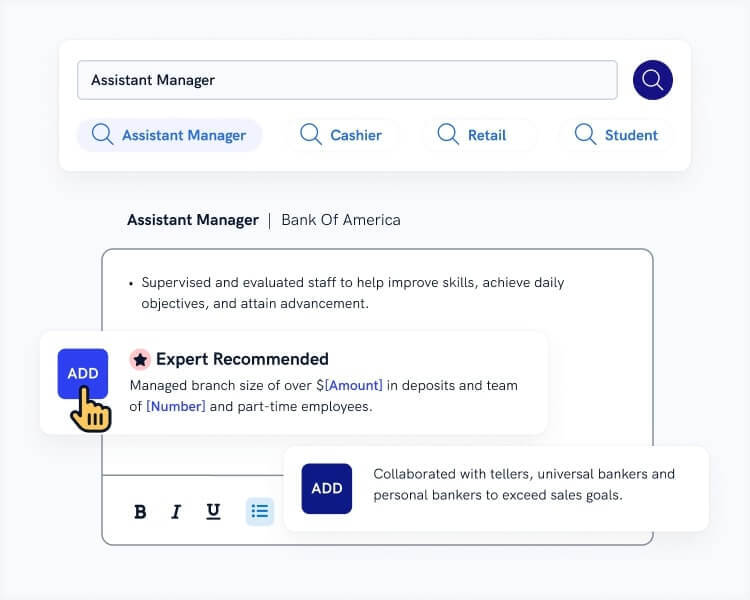
Want to save time and have your resume ready in five minutes? Try Zety’s Resume Builder. It’s fast and easy to use. Plus, you’ll get ready-made content to add with one click.
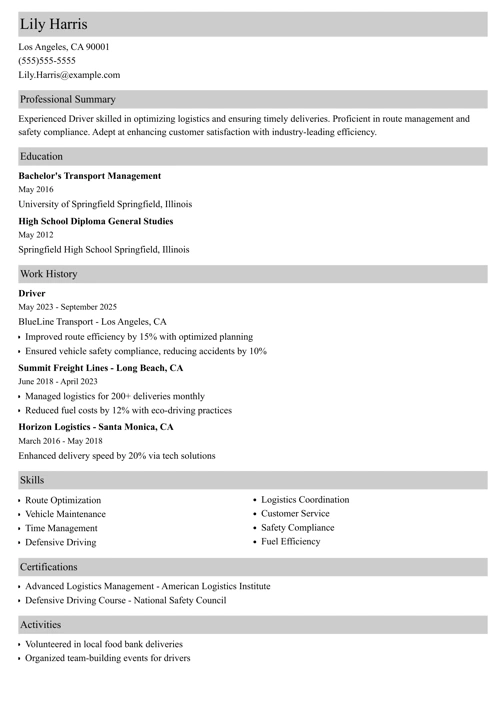
Sample resume made with our builder—See more resume examples here.
One of our users, Chris, had this to say:
You cannot go wrong with Zety. The company does best at enhancing your resume and helping market yourself better to land the job you love.
What Is a Resume Header?
A resume header is the section at the top of your resume that shows who you are and how employers can contact you. It includes your name and contact information, and it may also feature your job title or a short professional headline.
Although “resume header” and “resume heading” are sometimes used interchangeably, the header typically refers to this top contact information section. Section headings, such as “Work Experience” or “Education,” organize the rest of the resume.
Why Are Resume Headers Important?
Resume headers are important because they help recruiters quickly identify you and find the contact information they need to reach you. A clear header creates a professional first impression, makes your resume easier to scan, and reduces the risk of an employer overlooking the details they need to contact you.
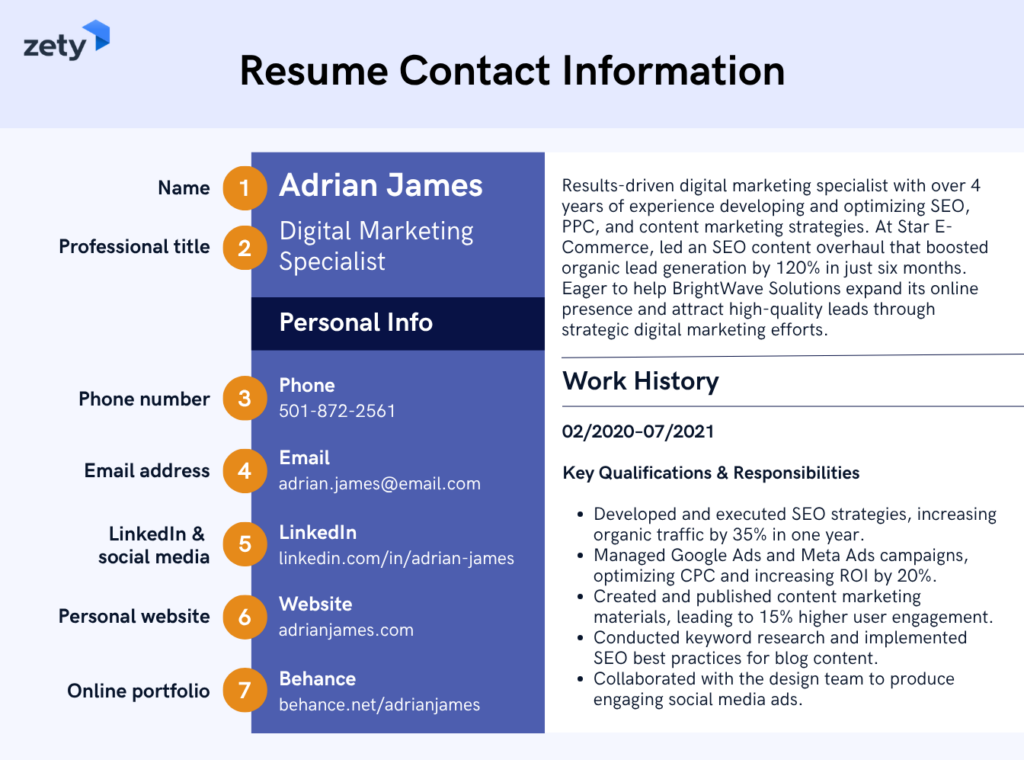
Here’s how an effective resume header should look:
What Should You Include in a Resume Header?
A resume header should include your full name, phone number, professional email address, and location. Depending on your field and application, you can also add a job title or headline, LinkedIn profile, portfolio or website, and relevant professional credentials.
Here are the required and optional items to include when writing your resume:
Required
Every resume header should include four basic details: your full name, phone number, professional email address, and location. Together, these details tell employers who you are, where you’re based, and how to contact you. Keep each element accurate, professional, and easy to find at a glance.
Full Name
Make your name the most visible part of your resume header. Use a larger font size than the rest of your text, typically 18 to 24 points.
Use the same professional name on your resume, job applications, and LinkedIn or other professional profiles you include. If you have a common name, adding a middle initial (e.g., John A. Lee) can also help distinguish you in recruiter databases.
Phone Number
Include a phone number that employers can easily reach you at. Use a professional voicemail greeting in case you miss a call. Double-check that the number is correct before submitting your resume.
Email Address
Your email address should look professional and simple. Ideally, it should include your first and last name. Avoid using nicknames, numbers, or outdated email accounts.
If your name is taken, use a variation of it that makes sense and is readable. Use reputable email service providers like Gmail or Outlook.
Location
List your city and state to show employers where you’re based. A zip code is optional, and you generally don’t need a full street address because employers rarely need your exact home address during the application stage.
If you’re relocating, make that clear. For instance, “Denver, CO 98765 (relocating to Austin, TX 43210)” or “Denver, CO | Open to relocation.”
For a remote job, you can usually list your city and state, state only, or another location that aligns with the employer’s geographic requirements rather than simply writing “Remote.”
Optional
Optional resume header details can provide employers with additional context about your qualifications and professional presence. Depending on your industry and target role, you might include a job title or headline, LinkedIn or another networking profile, a portfolio or website, or relevant professional credentials.
Job Title or Headline
A job title or resume headline quickly tells employers what you do and where your expertise lies. Keep it concise (ideally under 10 words), tailor it to the position you’re targeting, and skip generic buzzwords like “results-oriented.”
Here’s a simple formula you can use, with an example:
- Formula: [Job Title] | [Key Specialization]
- Example: Administrative Assistant | Real Estate Operations
You can also use a slightly more detailed resume headline when a qualification helps distinguish you, such as “Administrative Assistant With 2+ Years in Real Estate Operations.”
Networking Profile
A professional networking profile, such as LinkedIn or Bold.pro, can give employers a deeper look at your experience, skills, and professional presence. Only include a profile if it’s complete, up to date, and supports the qualifications presented on your resume.
Depending on your field, a professional profile on GitHub, Behance, or another industry-specific platform may be more useful than LinkedIn.
Portfolio or Website
If you work in a creative, technical, or freelance field, a portfolio or personal website can be very helpful. Many creative roles require visual examples of your work, so including a link in your resume saves hiring managers the trouble of asking for it.
Always make sure the link works and highlights your best work.
Certifications or Credentials
Professional certifications can add value in fields such as healthcare, IT, and finance. Include them only if they’re relevant to the job and still current. Write them after your name, like this: “Robert Ham, CPA.”
Pro tip: All of Zety’s resume templates include resume header templates. These headers use ATS-friendly formatting and help you organize your information neatly.
Making a resume with our builder is incredibly simple. Follow our step-by-step guide, use ready-made content tailored to your job, and have a resume ready in minutes.
When you’re done, Zety’s Resume Checker will score your resume and tell you exactly how to improve it.
How to Write & Format a Resume Header
To write a resume header, place your name first, followed by your phone number, professional email address, and location. Keep the layout simple and consistent, using readable fonts and clear separators so recruiters and ATS software can identify each detail quickly.
Follow these tips:
- Make your name stand out. Use an 18–24-point font to make it stand out from the rest of the header.
- Arrange contact details clearly. Separate horizontal details with pipe symbols (|), commas, or clean line breaks. Avoid crowding too much information together.
- Keep location formatting consistent. If you include a street address for a specific reason, don’t abbreviate street names unnecessarily. Also, avoid mixing full state names with state abbreviations throughout your resume.
- Use readable fonts and sizing. Keep contact information at 10–12 points in a professional font.
- Maintain an ATS-friendly design. Avoid relying on graphics, images, or decorative elements to communicate essential contact information.
- Handle a second page carefully. Repeat your name and add a page number so the second page is clearly connected to your resume. If you repeat contact information, keep it limited to essential details, such as your phone number and email.
- Keep your application materials consistent. Use the same fonts, layout, and resume header design on your cover letter to create a cohesive application package.
- Use icons sparingly. If you add resume icons, keep the corresponding contact information as readable text rather than relying on icons alone.
Resume Header Examples
Resume header examples can range from simple centered layouts to split or two-column designs. The right format depends on your resume style, but every version should keep your name and essential contact details prominent, readable, and easy for recruiters to scan.
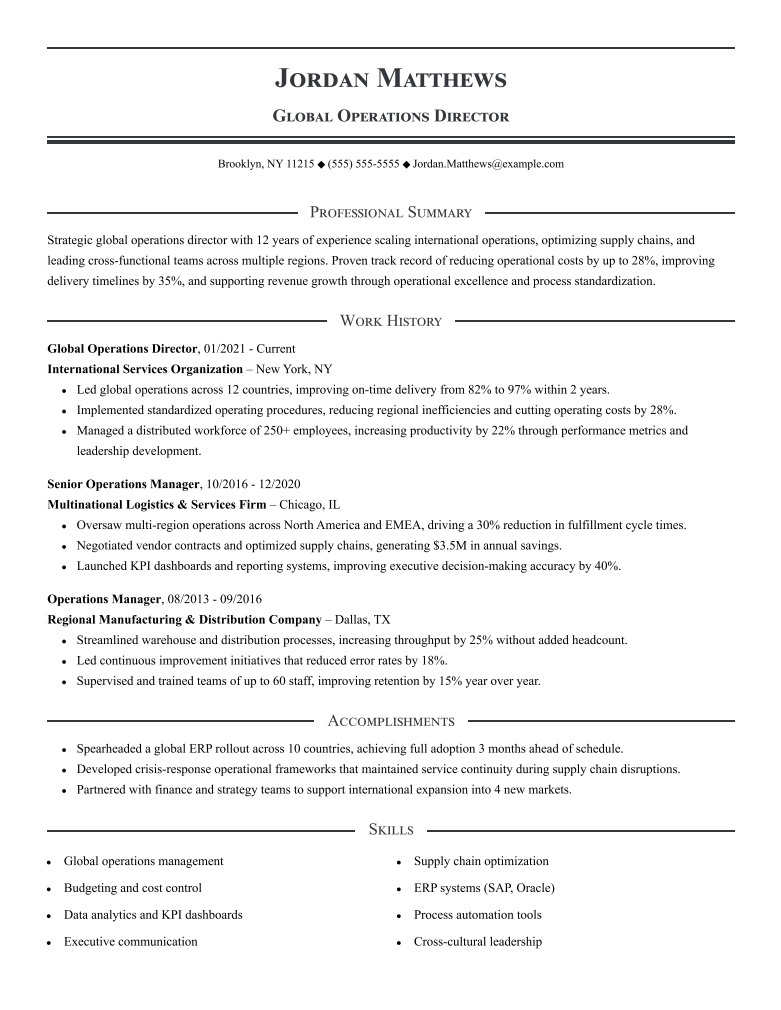
Centered Header
Centered headers create a classic, balanced look that can work well across industries, including finance, education, law, and government.
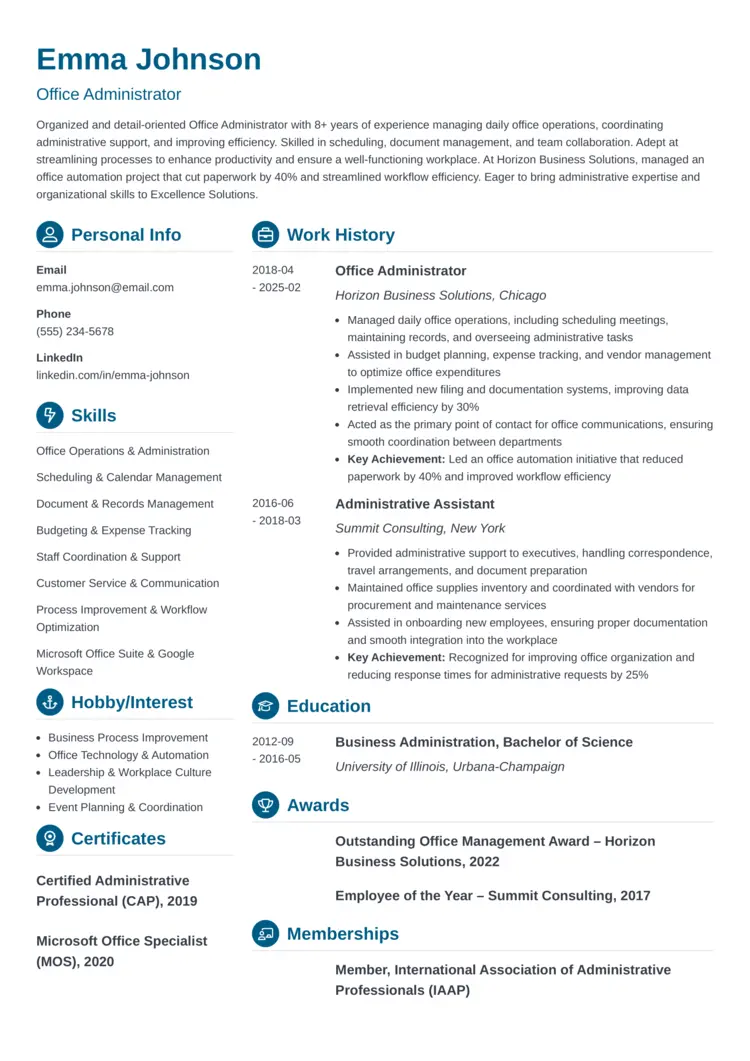
Two-Column Header
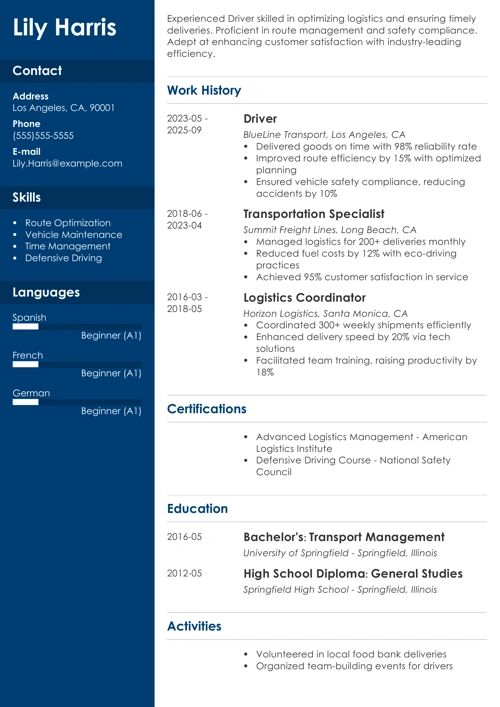
Two-column headers create a modern look that works well for creative industries and combination resumes. By separating your contact details from your name and qualifications, you make your information easy to scan. It also saves space at the top of your resume, leaving more room for your professional summary.
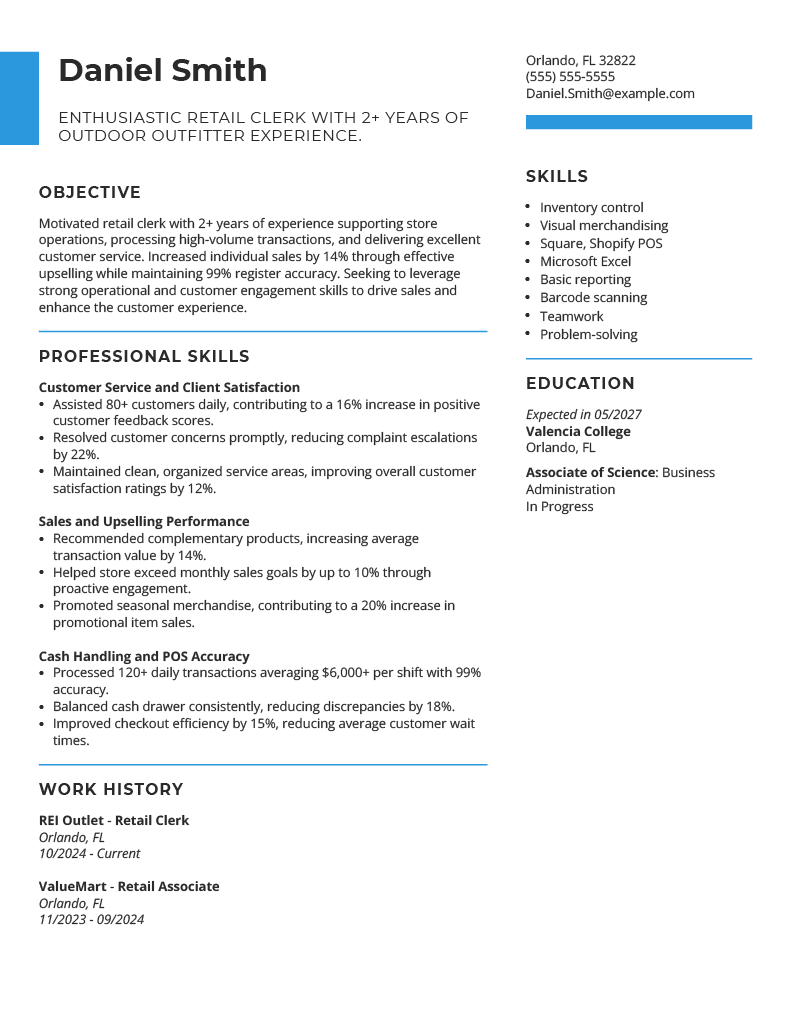
Split Header
Split headers separate your name and contact details with a horizontal line or visual divider. This style works well for minimalist resumes, especially in business, consulting, and corporate roles. It helps guide the reader’s eye across the page and creates a clear structure, making your resume visually appealing.
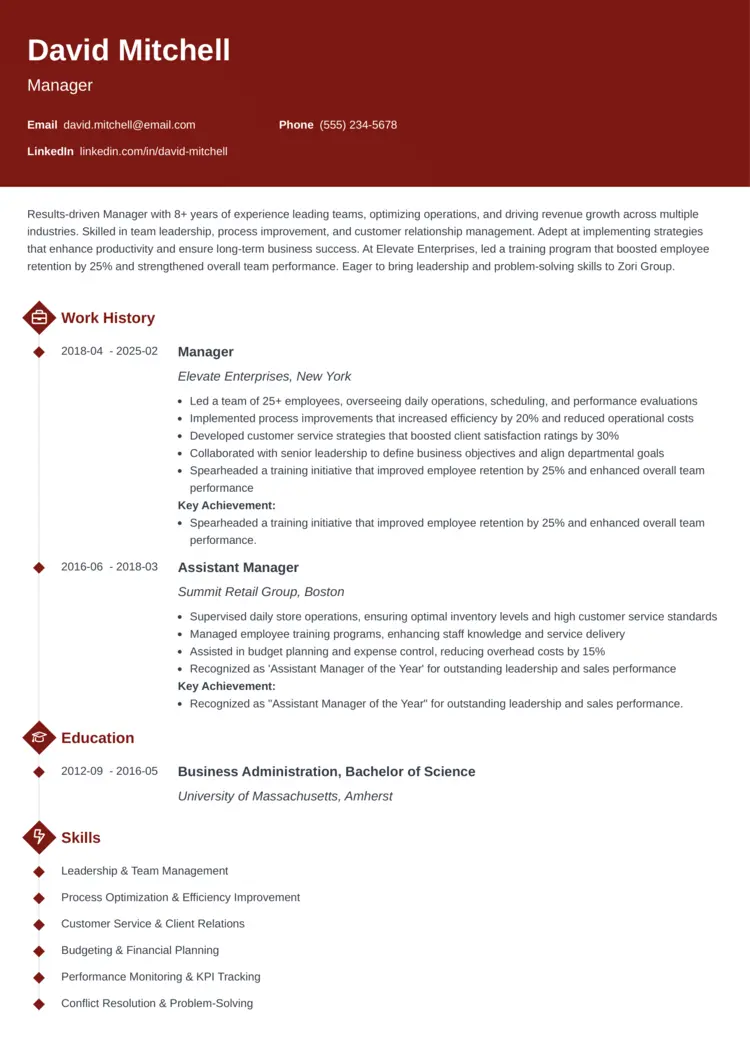
Banner Header
Banner headers use a bold colored background to separate your name and contact details from the rest of your resume. This style creates a strong visual break and helps your header stand out right away. It works well for roles where personality and branding matter. When using a banner header, avoid overly bright or dark colors that can make the text hard to read.
Common Resume Header Mistakes to Avoid
Common resume header mistakes include leaving out essential contact information, using an unprofessional email address, overcrowding the layout, and relying on design elements that make information difficult to read. Your header should make it easier, not harder, for employers and ATS software to identify and contact you.
Here are some common mistakes to avoid:
- Using an unprofessional email address: Emails with nicknames or outdated accounts look careless and unprofessional.
- Forgetting essential contact information: Without a phone number or email, employers can’t reach you for an interview.
- Writing in overly small or inconsistent fonts: Hard-to-read text makes your resume look sloppy and unorganized.
- Cluttered or crowded layout: Too much information in the header confuses readers and distracts from your content.
- Over-styling your header: Complex design elements can make information harder for some ATS software to parse, which may prevent your resume from being seen.
- Adding irrelevant links: If the position doesn’t require visual creative work, leave out your digital portfolio link. Only include links that support your resume.
- Placing contact details in document headers or footers: Some ATS software may not reliably capture text placed in document margins, so keep essential information in the main document body.
Key Takeaways
As you create your resume header, remember these key points:
- Double-check your phone number, email address, and links before sending each application.
- Match the name on your resume with the professional name you use on LinkedIn and other profiles.
- Tailor your location or relocation wording when geography matters for the role.
- Keep your job title or headline short, specific, and relevant to the position, rather than relying on generic buzzwords.
- Use readable, ATS-friendly formatting, and keep essential contact details in the main document body.
- Carry the same fonts and header styling into your cover letter for a cohesive application.
Frequently Asked Questions
What is a good header for a resume?
A good header for a resume clearly displays your full name, phone number, professional email address, and location at the top of the page. You can also include a concise job title or headline, LinkedIn profile, portfolio, or relevant credentials. Keep the design simple, readable, consistent with the rest of your resume, and easy for ATS software to process.
How do you write a header on a resume?
To write a resume header, put your full name at the top in a larger font, followed by your phone number, professional email address, and location. Separate contact details with pipe symbols, commas, or clean line breaks. You can then add relevant optional information, such as a job title, LinkedIn profile, portfolio, or professional credentials.
Should you put your address on your resume?
You generally don’t need to put your full street address on your resume. For most applications, your city and state provide enough location information while limiting unnecessary personal details. If you’re moving, you can add your current location followed by “relocating to” your destination or simply state that you’re open to relocation.
How do you list your location on a remote job resume?
On a remote job resume, list your city and state or state if the employer needs to confirm where you’re legally eligible to work. Don’t assume “Remote” alone gives employers enough information, since some remote jobs are restricted to particular states or regions. If you’re willing to move, you can also add “Open to relocation.”
Can ATS read a resume header?
Most ATS software can read a simple resume header when the information appears as plain text in the main document body. Avoid placing essential contact details only inside the header and footer area or relying on images, graphics, or icons to convey them. Simple formatting makes your information easier for both ATS software and recruiters to identify.
About Zety’s Editorial Process
This article has been reviewed by our editorial team to make sure it follows Zety’s editorial guidelines. We’re committed to sharing our expertise and giving you trustworthy career advice tailored to your needs. High-quality content is what brings over 40 million readers to our site every year. But we don’t stop there. Our team conducts original research to understand the job market better, and we pride ourselves on being quoted by top universities and prime media outlets from around the world.

Follow Zety as a preferred source in Google
Get more resume writing tips, career insights, and workforce trends in your personalized search experience. Learn more >

Share:


