![iOS Developer Resume: Sample & Writing Guide [20+ Tips]](https://cdn-images.zety.com/pages/ios-developer-resume-example-ztus-cta-02.webp)
Table of Contents
Get more resume writing tips, career insights, and workforce trends in your personalized search experience.
You know Apple’s iOS like the back of your hand. Working on a number of projects with other developers, you helped to design and code a few impressive apps.
But you started feeling a bit stuck at your current job. So you’ve found a bunch of job ads and applied to several companies. No replies.
And yet, your less experienced colleagues seem to get new job opportunities every day. The issue is clear—it’s your resume. Time to debug it and write a new one.
This guide will show you:
- An iOS developer resume example better than 9 out of 10 other resumes.
- How to write an iOS developer resume that will land you more interviews.
- Tips and examples of how to put skills and achievements on an iOS developer resume.
- How to describe your experience on a resume for an iOS developer to get any job you want.
Ready to speed up your job search with a perfect resume? Try our Resume Builder. It’s fast and easy to use. Plus, you’ll get ready-made content to add with one click. Check out hundreds of resume templates and design your resume here.
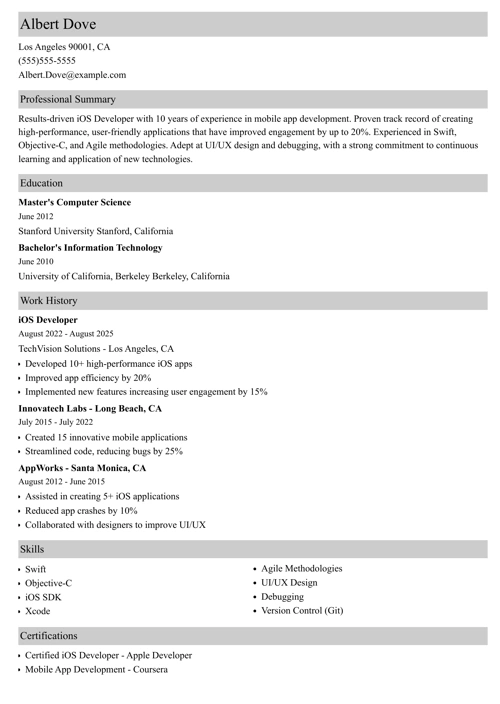
Sample resume made with our builder—See more resume examples here.
One of our users, Brittanya, had this to say:
Zety really helped me create the best resume possible. It pointed out how things could be better on my existing resume and suggested many things to be re-worded or removed.
Looking for other IT jobs? Check out our other resume writing guides:
- IT (Information Technology) Resume
- Programmer Resume
- Software Engineer Resume
- Senior Software Engineer Resume
- Entry Level Software Engineer Resume
- Intern Software Engineer Resume
- SQL Developer Resume
- Web Developer Resume
- Front End Developer Resume
- Java Developer Resume
- Resume Examples for All Careers
iOS Developer Resume Sample
Albert Dove
albert.dove@gmail.com
217-508-6058
Objective
Organized, collaborative, and highly skilled iOS developer with 6+ years of professional experience in dynamic and deadline-driven work environments. Eager to join BrambleSoft to delight its customers with magical experiences. In previous roles developed 10+ iOS apps that were downloaded over 700K times, and earned featured mentions in the App Store.
Work Experience
iOS Developer
FlyBy Technologies, Los Angeles, CA
2016–
- Performed technical designs and implementation of 10+ complex iOS apps.
- Reviewed client requirements, wireframes, and designs for technical feasibility.
- Collaborated with the scrum team to translate client requirements into implementable user stories.
- Improved product quality through code reviews, writing effective unit tests and collaborating with QA on implementing automation testing.
Key achievement:
- Developed and launched apps in over 50+ countries that earned featured mentions in the App Store.
- Achieved over 500K downloads on the App Store.
iOS Developer
INComparable Systems, Los Angeles, CA
2013–2016
- Worked closely with product managers and designers to define a rich iOS experience for the user.
- Supported the architect in improving the native iOS and tvOS codebase.
- Explored new technologies and shared findings with the team.
- Supported and streamlined company policies, procedures, mission, and standards of ethics and integrity.
- Led the discovery phase of medium to large projects to come up with a high-level design.
Key achievement:
- Designed and developed 2 augmented reality apps that were downloaded over 100K times within the first two weeks after publishing.
Education
MSc, Software Engineering
CalTech, Los Angeles, CA
2013
Key Skills
- 3rd party SDKs and API(S) integration
- Collaboration
- Communication
- FHIR/EPIC development
- iOS SDK
- iOS versions and devices
- Multi-threading
- Objective-C
- Organizational skills
- Swift
Languages
- Spanish—Advanced
- Portuguese—Communicative
Interests
- Video games
- Sci-Fi literature
Here’s how to write an iOS developer resume that can develop into a full-time job contract.
1. Choose the Best Format for Your iOS Developer Resume
Here’s the thing—
An ugly icon won’t encourage a user to download your app even if it’s in a class of its own.
Likewise, a shabby resume will leave the recruiter unimpressed.
These tips will help you get your iOS developer resume right:
- Start with an impressive heading of a resume, it’s the place where you put your personal information on a resume.
- Make the sections of your resume easy to navigate and visible.
- Format your resume so it highlights your experience and achievements. The chronological resume template will work best most of the time.
- Choose the best fonts for your resume. Stick to professional looking and readable ones.
- Be selective about the things you put on your resume. Leave some white space to make it look light and fresh.
- Export your resume to a PDF file. Use a DOC format only when asked to.
2. Write an iOS Developer Resume Objective or Summary
Your iOS developer resume must make a great first impression from the word go.
That’s why it’s crucial to know how to write a profile in a resume that stands out.
There are two possibilities:
A resume summary statement would look great on your senior iOS developer resume. A resume summary emphasizes your experience and key accomplishments.
A resume objective is more fitting for an entry-level iOS developer resume. It brings up your key skills and explains why they make you a great fit for the position.
Either way—
For maximum effect, put numbers like $ or % that demonstrate your impact.
Pro Tip: Put your profile at the top of your resume. But—write it after you write your entire resume. This way it will be much easier to pick out the stuff you’d like to show off from the start.
3. Create the Perfect iOS App Developer Job Description for a Resume
Your resume experience section is what the recruiter will make a beeline for.
So make sure yours sends a clear message—
You’re the next Craig Federighi.
How to do this?
Tailor your resume to the job. Here’s how to do this in a few simple steps:
- List your latest position first. Then move on to the previous ones.
- Make sure each entry has your job title, company name, location, and dates worked.
- Don’t present your experience in a paragraph form. Use 5-7 bullet points per job.
- Start your bullet points with the right resume words such as designed, led, developed, achieved, etc.
- Focus on the experience relevant to the job. Skip everything else.
Pro Tip: Read our article on resume dos and don’ts to make sure got everything right.
4. Make Your iOS Developer Resume Education Section Deliver
Your iOS developer resume must be great from start to finish.
That’s why you need to know how to list education on a resume the right way:
- Over 5 years of professional experience? Add info on your degree, school name, and location, as well as the graduation year.
- Less experience? Your education section could benefit from adding info on extracurricular activities, academic achievements, and relevant coursework.
If you hold any professional certifications and licenses, you can put them in a dedicated section to make them more visible.
Pro Tip: Consider listing your GPA (if it’s upwards of 3.5) if you graduated within the past three years or you’re making an iOS developer fresher resume.
5. Highlight Your iOS Developer Skills on a Resume
Here’s the thing—
If you have 20+ years of experience but no skills, no one is going to give a chance.
The list below is supposed to help you identify your strong points:
iOS Developer Examples of Skills
- 3rd party SDKs and API(S) integration
- Agile and Scrum workflow development
- Ajax
- ARkit
- Attention to detail
- C-based libraries
- Cocoa Touch
- Debugging
- FHIR/EPIC development
- Git version control
- HTML5
- iOS SDK
- iOS versions and devices
- Javascript
- jQuery
- jQueryMobile
- Leadership
- ML
- Mobile UI fundamentals
- Multi-threading
- MVC design
- Node.js
- Objective-C
- Objective-C
- Offline storage and threading
- OO skills
- React.js
- Reactive programming patterns (RX)
- RESTful APIs
- Siri
- Swift
- UIKit Framework
- Windows Universal App
- Xamarin
- Xcode
- Analytical skills
- Teamwork skills
- Communication
- Critical thinking
- Decision making
- Leadership
- Multi-tasking
- Organizational skills
- Prioritization
- Problem solving
- Time management
Here’s how to identify the best skills for your iOS developer resume.
- Prepare a comprehensive selection of all your skills to list on a resume. It should include your soft skills, hard skills, and technical strengths.
- Revisit the job posting to identify what skills the employer has listed by name.
- Find these exact skills on your list and focus on them when making your resume.
- Pick out up to 10 of your strongest skills and put them in a key skills section on your resume.
- Put your skills in various sections of your resume. The resume profile and job-description sections are great locations for your skills.
Pro Tip: Focus on your top skills. Leave out the ones you only have an elementary knowledge of. This way you’ll avoid the so-called presenter’s paradox.
Making a resume with our builder is incredibly simple. Follow our step-by-step guide, use ready-made content tailored to your job and have a resume ready in minutes.
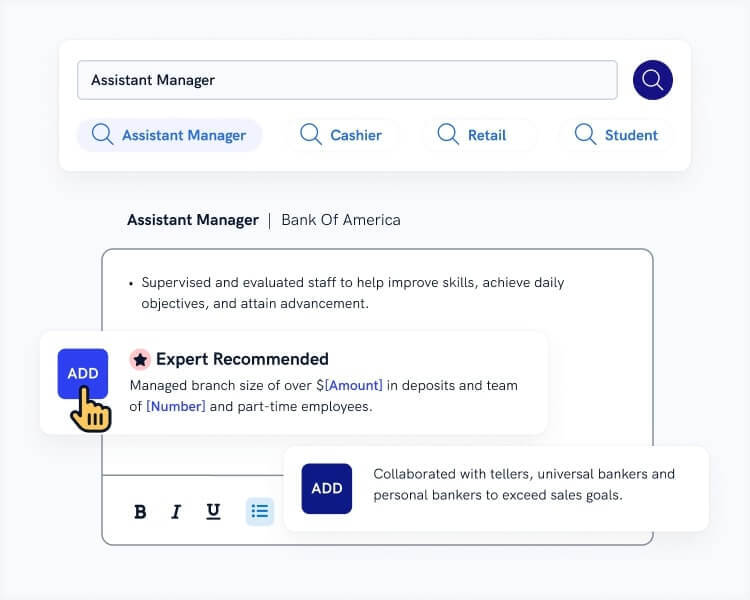
When you’re done, our professional resume builder will score your resume and our ATS resume checker will tell you exactly how to make it better.
6. Add Other Sections to Your iOS Developer Resume
Show them you’ve got a lot to offer and you’re a great cultural fit too.
You may want to include the following sections:
Read more: Programming Projects for a Resume
7. Attach an iOS Developer Resume Cover Letter
Should you write a cover letter?
Absolutely.
Cover letters still count and more than half of the recruiters would like to read yours.
Here’s how to write a cover letter with no pain:
- Decide what would be the best format for your cover letter.
- Choose the best way to start a cover letter.
- Show what value you’ll bring to the company.
- Make sure your cover letter last paragraph calls the reader to action.
See to it that your cover letter isn’t too long.
Pro Tip: Learn how to follow up on a job to show you’re seriously interested in the job.
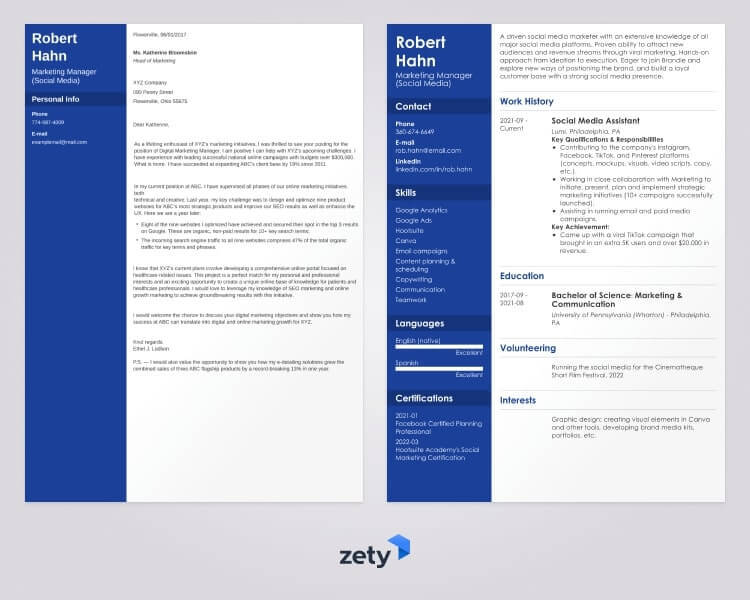
Plus, a great cover letter that matches your resume will give you an advantage over other candidates. You can write your cover letter for resume using our builder here. Here’s what it may look like:
This is it!
This is how you make a job-winning resume for iOS developer positions.
About Zety’s Editorial Process
This article has been reviewed by our editorial team to make sure it follows Zety’s editorial guidelines. We’re committed to sharing our expertise and giving you trustworthy career advice tailored to your needs. High-quality content is what brings over 40 million readers to our site every year. But we don’t stop there. Our team conducts original research to understand the job market better, and we pride ourselves on being quoted by top universities and prime media outlets from around the world.
Sources

Follow Zety as a preferred source in Google
Get more resume writing tips, career insights, and workforce trends in your personalized search experience. Learn more >

Share:


