Table of Contents
Get more resume writing tips, career insights, and workforce trends in your personalized search experience.
Your resume is your first chance to make a great impression. But if you haven’t updated it in a while, it may no longer reflect your strengths. Maybe you’ve gained new responsibilities, learned new tools, or changed career paths.
Whatever the reason, keeping your resume up to date is essential in today’s competitive job market. In this guide, you’ll learn how to refresh your resume step by step so it helps you land more interviews.
Want to save time and have your resume ready in 5 minutes? Try Zety’s Resume Builder. It’s fast and easy to use. Plus, you’ll get ready-made content to add with one click.
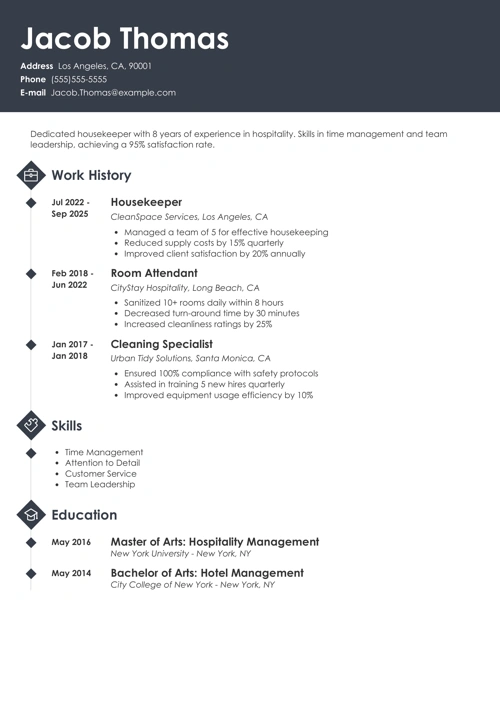
Sample resume updated with our builder—See more resume examples here.
Why Updating Your Resume Is Important
Updating your resume is important because it ensures your skills, experience, and achievements reflect who you are today, not who you were years ago. As your career grows, you take on new responsibilities, learn new tools, and develop stronger skills.
If your resume doesn’t show these changes, employers may overlook you for roles you’re qualified for. A current resume also helps you stay prepared, so you’re ready to apply when a great opportunity appears.
How to Update a Resume in 10 Steps
To update your resume, start by reviewing your current content, adding recent experience and skills, removing outdated information, and tailoring everything to the job you want.
Instead of feeling overwhelmed, follow this step-by-step process to help you stay focused and confident. Let’s break it down.
Step 1: Optimize Your Resume for ATS
It’s never been more important to ensure your resume is easy for both employers and applicant tracking systems (ATS) to read. After all, 90% of employers use machine learning to screen candidates.
Follow these tips to ensure your resume is ATS-friendly
- Use a professional font such as Arial, Helvetica, or Calibri for better readability.
- Set the font size to 10 or 12 pt. for body text and 14 or 16 pt. for section headers.
- Ensure your margins are set to 1 inch on all sides to keep your layout balanced.
- Maintain consistent spacing throughout your document, preferably 1.15 to 1.5 spacing.
- Save your file with a professional name, such as Job-Title-Resume-Your-Name.pdf.
Step 2: Review Your Resume Format
If you created your resume years ago, it’s worth checking whether its format still matches your current experience level and career goals.
For example, many entry-level job seekers start with a functional resume that emphasizes skills rather than work history. But once you’ve gained steady experience, a combination or chronological format often works better.
Review the main resume formats to ensure your document presents your experience in the strongest possible way:
- Chronological resume: It focuses on career growth by highlighting your work experience. It’s the most common format and is recommended for experienced job seekers.
- Combination resume: It balances skills and work history, making it a strong choice for mid-level professionals.
- Functional resume: It places skills at the top to help entry-level job seekers and career changers offset limited experience.
Pro tip: Zety’s resume templates are available in all three formats and optimized for ATS. Instead of rebuilding your resume from scratch, choose a template that already meets employer standards to save time and increase your chances of getting noticed.
Step 3: Freshen Up Your Resume Header
An outdated resume header can hurt your chances of passing to the next hiring stage.
Make sure your contact information is up to date and easy to read. Include your first and last name, phone number, and a professional email address.
For privacy, skip your full home address—city and state are enough if location matters. A resume photo is unnecessary, so leave it off.
Add your LinkedIn profile and any online portfolio or website that can boost your application and show off your work.
Step 4: Dust Off Your Resume Summary
It’s crucial to refresh your resume summary with new achievements, skills, and experiences that are most relevant to the role you’re applying for.
For those with over five years of experience, consider switching from a resume objective to a professional summary. While an objective focuses on what you hope to contribute, a summary highlights what you bring to the table: your results, skills, and accomplishments.
Even small updates, like adding recent projects or promotions, can make your summary much more compelling and help you stand out.
Let’s see this in practice:
Entry-level resume objective (4 years ago)
Marketing graduate with internship experience seeking an entry-level position to apply skills in social media and content creation. Eager to contribute to a team environment while gaining hands-on experience in campaign management, digital advertising, and audience engagement. Looking for an opportunity to apply coursework in marketing strategy and analytics to real-world projects and build a foundation for a long-term career in marketing.
Mid-level resume summary (Today)
Marketing specialist with 5 years of experience growing brand presence and engagement for tech startups. Increased social media following by 120% and led campaigns generating $200K in new revenue. Skilled in content strategy, digital advertising, and analytics, with a track record of delivering measurable results and leading cross-functional teams.
Step 5: Add New Work Experience
Add any new roles, promotions, or responsibilities you’ve gained since you last updated your work experience section. If you drove meaningful results in your workplace, add those accomplishments using metrics whenever possible, to make this section pop.
Did you increase sales, improve efficiency, lead a successful project, or save the company time or money? Even small wins matter.
For example, instead of saying “managed social media accounts,” say “managed social media accounts and grew followers by 35% in 6 months.” Numbers grab attention and make your contributions clear.
Pro tip: Action-oriented language conveys initiative and helps to save valuable resume space. Start each bullet point with an action verb to maximize impact.
Step 6: Refresh Your Skills List
When updating your resume, make sure to add new skills you’ve learned since your last update, whether they’re technical tools, software, or soft skills like leadership and communication.
Focus on relevance. Include professional skills that match the role you’re applying for and remove outdated or less important ones. This ensures your resume stays targeted.
Step 7: Include New Educational Credentials
If you’ve earned a new degree or professional credential since your last resume update, be sure to add it. Continuing your education shows employers that you’re committed to learning and improving your skills.
List your most recent credential first, and remove older or less important details if your education section feels crowded. Remember to include the degree, the institution’s name, and graduation date.
Step 8: Tailor Your Resume to the Job
Customize your resume for each role by matching your skills, experience, and language to the job description. Tailoring your resume shows employers that you understand their needs and are genuinely interested in the position.
Use these tips to customize your resume effectively:
- Review the job posting and identify keywords you can include in your resume to highlight relevant qualifications.
- Adjust your resume summary to reflect the role’s main requirements.
- Reorder your bullet points so the most relevant responsibilities and achievements come first.
- Mirror the employer’s language when describing your skills and achievements.
- Remove unrelated information that doesn’t support your application.
- Customize your resume headline or job title to match the position.
Step 9: Add New Sections
Adding new, relevant sections helps showcase achievements and experiences that don’t fit neatly under work history or education, but still matter to employers.
For example, you might add a certifications section if you’ve earned new credentials, a publications section if you’ve contributed to industry journals, or a projects section to highlight major accomplishments.
Volunteer work, professional affiliations, and awards can also boost your profile when they relate to the role.
Section ideas to consider:
- Certifications and licenses
- Publications or presentations
- Key projects
- Volunteer experience
- Professional memberships
- Awards and recognitions
Additional sections appear in only 43% of resumes, so adding one that supports your career goals and target job can help you stand out.
Step 10: Double-Check Everything
Before you send out that resume, double-check your spelling, grammar, dates, and names. Ask a friend or colleague to proofread your resume and ensure everything is in the right place.
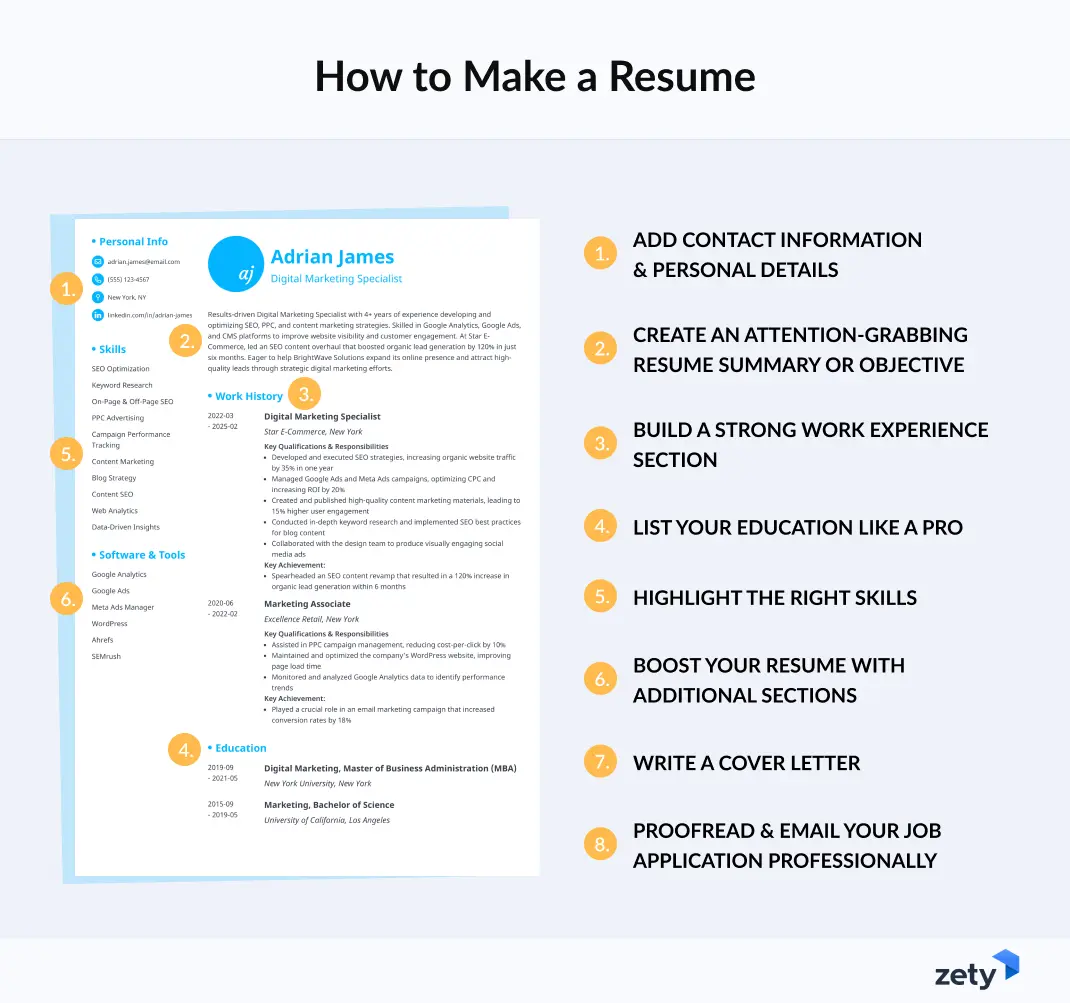
Use this handy resume to-do list to go over every step:
Key Takeaways
Remember these key points:
- Updating your resume regularly helps ensure your skills, experience, and achievements reflect your current career level.
- Clean formatting and an ATS-friendly layout improve your chances of getting noticed by employers.
- Refreshing your summary and work experience with measurable results makes your resume more impactful.
- Adding new skills, education, and credentials keeps your resume relevant in a changing job market.
- Tailoring your resume to each job application increases your chances of landing interviews.
- Including relevant additional sections can help you stand out from other candidates.
Frequently Asked Questions
How do I update my existing resume?
To update your existing resume, start by removing outdated information. Then add your most recent jobs, skills, and achievements. Review your professional summary and resume format to make sure they reflect your current career level.
Update your formatting and tailor your resume to the job you’re applying for. Finally, proofread carefully to catch any errors before submitting.
What is the easiest way to edit a resume?
The easiest way to edit a resume is by using Zety’s Resume Builder, which lets you update your content directly from your mobile phone or computer. The builder provides tips, formatting tools, and job-specific content suggestions to help you quickly update your resume.
You can change text, rearrange sections, and switch templates in just a few clicks. Our templates also offer flexible customization options for colors, fonts, spacing, and more.
How often should you update your resume?
You should update your resume every six months or whenever you gain new skills, responsibilities, or achievements. Keeping it current helps you stay ready for new opportunities and reduces stress when you need to apply quickly.
Regular updates also make it easier to remember important accomplishments before you forget them.
What are the top 5 resume mistakes?
The top five resume mistakes are:
- Using outdated information
- Including spelling or grammar errors
- Listing job duties without results
- Using poor formatting
- Sending the same resume to every employer
These mistakes can make your resume look unprofessional and lower your chances of getting an interview. Always keep your resume updated with your most relevant workplace results and use the right tools to ensure proper spelling, grammar, and formatting.
What looks good on a resume?
A good resume features clear formatting, strong achievements, relevant skills, and easy-to-read sections. Employers like to see measurable results, a professional summary, and keywords that match the job description.
A clean layout, consistent font, and tailored content also help your resume make a strong first impression.
About Zety’s Editorial Process
This article has been reviewed by our editorial team to make sure it follows Zety’s editorial guidelines. We’re committed to sharing our expertise and giving you trustworthy career advice tailored to your needs. High-quality content is what brings over 40 million readers to our site every year. But we don’t stop there. Our team conducts original research to understand the job market better, and we pride ourselves on being quoted by top universities and prime media outlets from around the world.

Follow Zety as a preferred source in Google
Get more resume writing tips, career insights, and workforce trends in your personalized search experience. Learn more >

Share:


